Frequently asked questions
- Is QubKey free?
- Yes. QubKey is free during the beta. An open-source release under the MIT license is planned, but there is no public repository yet. You can use the app for free today.
- Is my data stored in the cloud?
- By default, no. QubKey is local-first: all your data stays on your device in encrypted .rkvey files. You keep full control — you can back up, move, or copy your vault files without depending on a cloud service. Optional cloud sync between your own devices may be enabled if you choose; it remains user-controlled and does not change the local-first design of the application.
- Can I share entries securely?
- Yes. From a vault entry you can create a temporary encrypted link (duration, max views, optional password) or send the entry to another QubKey account. Peer shares use X25519 key exchange and AES-256-GCM; recipients accept or dismiss in their inbox. You choose granted rights (read, modify, duplicate, temporary link, forward) and can revoke access. Optional attachments stay encrypted end to end.
- Is QubKey open-source?
- Not yet as a public repository. An open-source release under the MIT license is planned; the code is not available on GitHub at this time. Until then, QubKey remains local-first, uses standard cryptographic algorithms, and the .rkvey format is documented for transparency.
- What platforms are supported?
- The QubKey 2.0.0 desktop app is available for macOS (Apple Silicon, DMG installer); Windows 10/11 remains on 1.0.2 (NSIS and MSI installers, x64 and x86). Linux is in active development. The app is built with Tauri for native multi-platform performance, with system-specific integrations: Keychain on macOS and Credential Manager on Windows. Browser extensions are available for Chrome and Firefox on macOS and Windows. Each platform has its own extension package — macOS and Windows builds are not interchangeable.
Yourpasswords,yourcontrol,yoursecurity
Local-first, secure password manager. Free during beta. Download for macOS and Windows, or explore the product below.
Whyalocalpasswordmanager?
Cloudsolutionspresentrisks.QubKeygivesyoutotalcontrol.
The Problem
- Your data stored in the cloud without your control
- Risks of data leaks and security breaches
- Dependence on third-party services for your secrets
- Lack of transparency on encryption and security
- Inability to audit the source code
The QubKey Solution
- 100% local data with secure .rkvey format
- Optional cloud sync: enable it if you want, you keep full control
- AES-256-GCM and XChaCha20-Poly1305 encryption with Argon2id
- Planned open-source (MIT) — Rust + Tauri + React; public repository coming later
- Zeroization of sensitive data in memory after use
- WAL (Write-Ahead Log) for crash recovery
Featuresmain
Everything you need to manage your secrets securely.
Enhanced security
AES-256-GCM and XChaCha20-Poly1305 encryption, Argon2id key derivation with secure parameters, zeroization of sensitive data, .rkvey format with cryptographic signature.
20 entry types
Manage all your secrets: passwords, bank cards, documents, SSH/PGP keys, tokens, passkeys, crypto wallets, identity documents, and more.
Modern interface
Clean design with light/dark/system themes, smooth navigation, instant search, advanced filters and quick actions for an optimal experience.
Advanced features
Password and passphrase generator, TOTP/2FA (RFC 6238), security dashboard with health score, detailed analysis, history/versions, and secure sharing (temporary link or QubKey user).
Optional sync
Local-first by default. Optional end-to-end encrypted cloud sync across your devices — the server never sees plaintext. Manage linked vaults in My space.
Securityenhanced
Every aspect of QubKey is designed with security as the absolute priority.
AES-256-GCM Encryption
High levelHigh-level authenticated encryption (AEAD) with unique nonces per entry. XChaCha20-Poly1305 alternative available. Complete protection of data at rest.
Argon2id Derivation
Attack resistantSecure key derivation with calibrated parameters (p95 ≈ 200-300ms). Resistant to brute force and GPU attacks thanks to memory-hard design.
Zeroization
Memory protectionSecure erasure of sensitive data in memory after use. Keys, passphrases and secrets are automatically cleaned on vault lock.
Auto-lock
ConfigurableConfigurable automatic locking after inactivity (default: 5 minutes). Secure clipboard with automatic erasure after timeout.
.rkvey Format
Cryptographic signatureSecure vault files with "RKVE" cryptographic signature, B-Tree index for O(log n) search, WAL for crash recovery, intelligent LZ4 compression.
Audited and verified
Planned license: MIT — public repository not available yet
BuiltinRustforuncompromisingsecurity
QubKey's core is written in Rust — a memory-safe language that eliminates entire classes of vulnerabilities by design. No null pointer exceptions, no buffer overflows, no data races. Combined with AES-256-GCM authenticated encryption, Argon2id key derivation, and automatic zeroization of secrets in memory, QubKey is engineered from the ground up for security-critical workloads.
Manageallyoursecretsinoneplace
QubKey supports 20 different entry types to cover all your needs.
Moderninterfaceandintuitive
A polished user experience for efficient management of your secrets.
Customizable themes
Light, dark or system mode to match your preferences.
Responsive design
Interface optimized for mobile, tablet and desktop.
Smooth navigation
11 complete pages with intuitive navigation and quick actions.

QubKey Dashboard
Overview of your vault with security statistics and quick access to your main features.
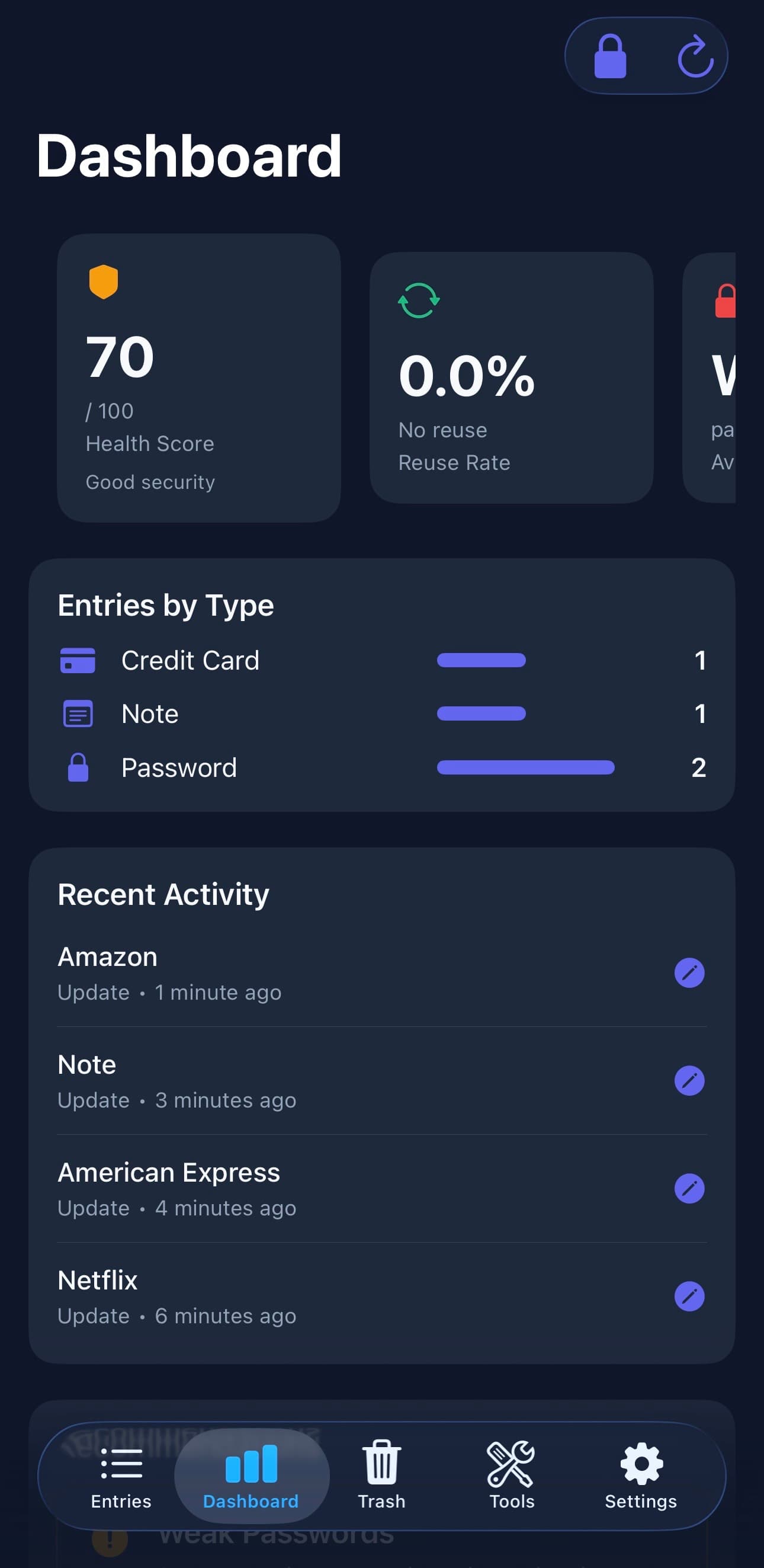
Yoursecretsinyourpocket
Access all your secrets from your smartphone with the same security and features.
Explore the interface
Mobile features
Native security
AES-256-GCM encryption, biometrics (Face ID/Touch ID), auto-lock.
Instant search
Find your secrets instantly with real-time search.
Built-in generator
Password and passphrase generator directly in the app.
TOTP/2FA
Real-time two-factor authentication code generation.
Mobile dashboard
Track your security score and metrics from your phone.
20 entry types
Access all your secrets: passwords, cards, documents, SSH keys...
Coming soon
iOS and Android apps in development
Browserextension
Available for all major browsers. Native integration with the desktop application via Native Messaging.
Click Chrome or Firefox for downloads and step-by-step installation.


Secure autofill
Automatic form filling with your credentials stored in your local vault.
Automatic sync
Real-time synchronization with your desktop application via Native Messaging.
Native security
Secure communication between the extension and desktop application, your data never leaves your device.
Advancedfeatures
Powerful tools for optimal security management.
Password generator
Customizable generator (length, characters) with strength indicator (0-100 score, entropy, crack time). Passphrase generation with WLEX wordlists (6 languages). PIN generation.
TOTP/2FA
TOTP code generation per RFC 6238 (SHA1/SHA256/SHA512, 6/8 digits, configurable period). QR code scanner for automatic import. Display with timer and progress bar. Auto-refresh and secure copy.
Myspace
One free QubKey account for sync, secure shares, sessions, and support — without unlocking your vault in the browser.
SecurityTools
Free browser-based utilities to generate passwords, encrypt text, and share secrets securely.
Builtwiththebesttechnologies
A modern stack for a performant and secure application.
Availablein16languages
QubKey is translated into the world's major languages for an accessible experience for everyone.
Français
French
English
English
Español
Spanish
Português (Brasil)
Portuguese (Brazil)
Deutsch
German
العربية
Arabic
हिन्दी
Hindi
简体中文
Chinese (Simplified)
繁體中文
Chinese (Traditional)
日本語
Japanese
한국어
Korean
Italiano
Italian
Nederlands
Dutch
Türkçe
Turkish
Русский
Russian
Polski
Polish
DownloadQubKey
QubKey 2.0.0 is available for macOS (Apple Silicon); Windows 10/11 remains on 1.0.2. Linux is in development.
Browser extension testing complete
The Linux desktop build is still in preparation. macOS and Windows are available for download above.

macOS (Apple Silicon)
macOS 13+ for M1, M2, M3, M4 and later
Version: 2.0.0 — Apple Silicon (arm64)

Windows
Windows 10/11 — NSIS and MSI installers for 64-bit or 32-bit
Version: 1.0.2 — x64 and x86

Linux
In development
Version: Coming soon
Join the Beta
Be among the first to test QubKey
We respect your privacy. You can unsubscribe at any time.